📲 Step-by-step guide
How to import recipes
Spotted a great recipe on social media or a website? Here's how to save it to Plan My Plate in a few taps.
Your device
Import from
📸
Importing from Instagram
iPhone · iOS
✨
Pro tip: Recipes import much more accurately when the ingredients and instructions are written out in the caption. Video-only posts may not import as well.
- 1Open Instagram and find the recipe post or Reel you want to save.
- 2Tap the Share icon (paper plane) below the post.

- 3Swipe through the app row at the bottom and tap Share.
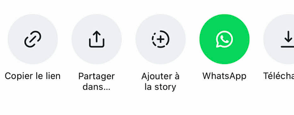
- 4Find Plan My Plate in the list and tap it.
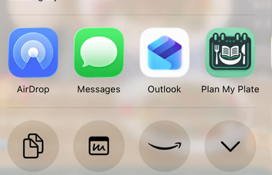
- 5The recipe imports automatically, review and save it!
💡
Don't see Plan My Plate in the share list? Make sure the app is installed, it appears automatically once it's on your device.
📱
You can also import directly from the app
No need to leave the app.
1Tap the + button to add a new recipe.
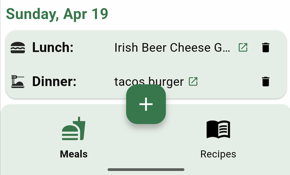
2Select Add Recipe from the menu.
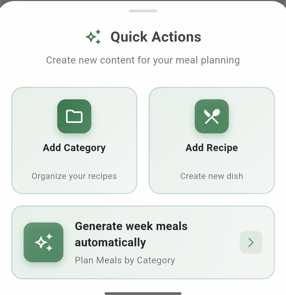
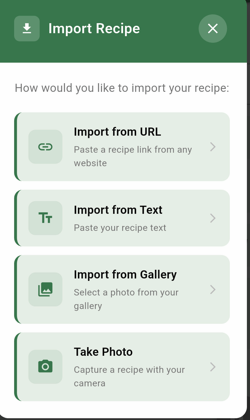
3Tap Import Recipe.
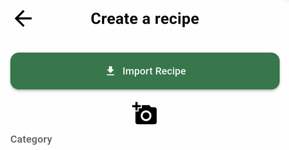
4Choose the Import from URL option as your source.
5Confirm by tapping Import.
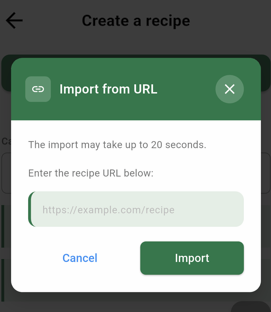
6The recipe imports automatically, review and save it!